
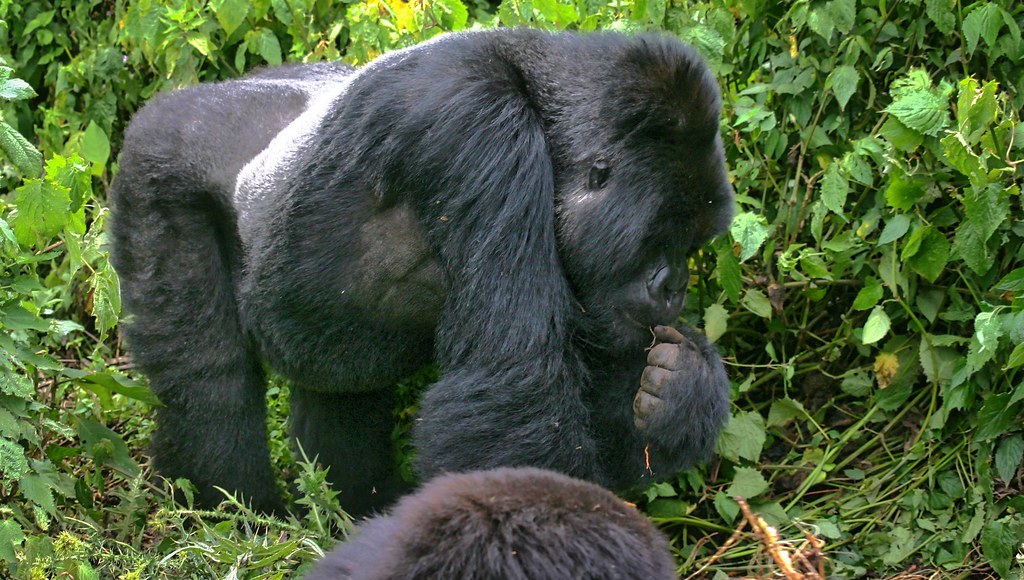
Can You Use Your Phone on a Gorilla Trek?
Yes, you can bring your phone on a gorilla trek in Uganda or Rwanda. A smartphone can be useful for taking photographs, checking the time, recording memories and keeping important travel information available. However, using your phone during a gorilla encounter requires care because mountain gorillas are wild animals, and visitors must follow strict rules designed to protect both the gorillas and the people observing them.
Gorilla trekking takes place in natural forest habitats, where trails can be steep, muddy, wet and covered with vegetation. Your phone should therefore be protected against rain and accidental damage. You should also be prepared for limited mobile network coverage, especially inside dense forests.
The most important distinction is between carrying your phone and using it while you are near the gorillas. Carrying a phone is generally permitted, but photography, video recording, sound, flash and other activities must follow the instructions of your guide and the park authorities.
Whether you are visiting Bwindi Impenetrable National Park or Mgahinga Gorilla National Park in Uganda, or Volcanoes National Park in Rwanda, understanding the rules before entering the forest will help you enjoy the experience responsibly.
Are Mobile Phones Allowed During Gorilla Trekking?
Mobile phones are generally allowed on gorilla trekking excursions. Visitors commonly carry smartphones to take photographs, check the time and keep personal information accessible during the hike.
However, permission to carry a phone does not mean that every use is automatically permitted. Gorilla trekking is a regulated wildlife activity, and your guide will explain the rules before you enter the forest and again when necessary during the encounter.
Your phone should remain on silent mode throughout the trek. Loud ringtones, notification sounds, music and phone conversations can disturb other visitors and potentially affect the gorillas. Avoid playing audio or making unnecessary noise while walking through the forest.
During the gorilla encounter, give your attention to the animals and follow the guide’s instructions. You may have an opportunity to take photographs, but do not allow your phone to distract you from maintaining the required distance or responding to instructions.
If your guide asks everyone to lower their cameras or phones, put your device away immediately. The guide may need visitors to remain quiet, move carefully or change position depending on the gorillas’ behaviour.
Can You Take Photos of Mountain Gorillas With Your Phone?
Yes, smartphone photography may be permitted during a gorilla trek, provided you follow the applicable park rules and your guide’s instructions.
Modern smartphones can produce excellent photographs in suitable lighting, and many visitors use them to record their gorilla trekking experience. However, forest conditions can be challenging because the canopy blocks sunlight, vegetation creates shadows and gorillas may move between areas of bright and dim light.
Before the trek, familiarise yourself with your phone’s camera settings. Learn how to focus quickly, adjust exposure and switch between camera modes without spending too much time looking at the screen.
During the encounter, take photographs quietly and avoid sudden movements. Do not move closer to a gorilla to improve the composition of a picture. Your guide will determine where the group should stand and how to respond if the animals move towards the visitors.
Never use flash unless the relevant park authority and your guide explicitly confirm that it is permitted. Flash photography is generally prohibited or strongly restricted during gorilla encounters because it can disturb the animals. The safest approach is to keep the flash switched off before the trek begins.
Remember that the opportunity to see mountain gorillas is more important than obtaining a perfect photograph. Take a few pictures when appropriate, then spend time observing the gorillas directly.
Can You Record Videos During a Gorilla Trek?
Video recording may be possible when permitted by the park authorities and your guide. However, you should not assume that every type of recording is acceptable in every situation.
If video recording is allowed, keep your phone quiet and avoid using bright lights. Do not narrate loudly, play sounds to attract attention or move around the group while filming.
Long recordings can also distract you from the experience. Instead of recording the entire encounter, consider taking a few short clips when your guide confirms that it is appropriate. This allows you to enjoy the gorillas without spending the entire viewing period looking at a screen.
If a gorilla approaches, changes direction or displays behaviour that requires the group to respond, stop recording and follow your guide’s instructions. Your safety and the welfare of the animals always take priority over capturing footage.
Do not use your phone to livestream the encounter or make calls during the viewing period. Apart from potentially disturbing other visitors, these activities can interfere with the quiet atmosphere expected during gorilla trekking.
If you intend to produce commercial footage or professional content, check the relevant permit and filming requirements before your visit. Ordinary visitor photography and commercial filming may be subject to different conditions.
Can You Use Your Phone Near Gorillas Without Disturbing Them?
Yes, but responsible use requires more than simply keeping the phone quiet. Mountain gorillas are sensitive to the behaviour of people around them, and visitors must avoid actions that could cause unnecessary disturbance.
Keep your movements slow and controlled. Do not wave your phone around, stretch your arm towards a gorilla or lean forward to take a close-up photograph. Avoid sudden movements that could make the animals uncomfortable.
Maintain the distance specified by your guide and the park authorities. Gorilla viewing rules can change in response to animal behaviour, health considerations and conservation guidance, so follow the instructions given on the day rather than relying solely on advice from an older travel article.
Do not attempt to attract a gorilla’s attention by calling, making noises or showing it something on your phone. Never offer a phone or any other object to a gorilla.
If a gorilla approaches the group, remain calm and follow your guide’s instructions. Do not move towards the animal to get a better picture, and put your phone away if instructed.
Responsible phone use allows you to preserve memories while respecting the gorillas’ natural behaviour and the experience of other visitors.
Is There Mobile Network Coverage in Gorilla Trekking Areas?
Mobile network coverage varies considerably across gorilla trekking destinations. You may have a signal at your lodge, in a nearby town or at the park headquarters, but lose it once you enter the forest.
Bwindi Impenetrable National Park has thick vegetation and steep terrain that can make mobile reception unreliable. Coverage in Mgahinga Gorilla National Park and Rwanda’s Volcanoes National Park also depends on your location, network provider and surrounding landscape.
Do not expect to make reliable calls or use mobile data throughout the trek. If you need to contact family, your tour operator or your accommodation, try to do so before entering the forest.
Download important travel documents, booking details, maps and other information before departure. Save emergency contact numbers and your accommodation details somewhere accessible offline.
If you are using your phone for photography, consider switching to airplane mode while keeping the camera available. This can reduce battery consumption and prevent calls or notifications from interrupting the experience. If you need to remain reachable for an important reason, speak to your guide and manage your phone settings accordingly.
Mobile coverage should never be treated as a substitute for the arrangements made by your trekking guide or tour operator.
How Should You Protect Your Phone From Rain and Mud?
Gorilla trekking takes place in tropical forests where rain can occur throughout the year. Even during generally drier periods, showers, wet vegetation and muddy trails are possible.
A waterproof phone pouch or protective case is useful, particularly if your phone is not designed to withstand water exposure. Keep your device in a secure pocket or compartment when you are not using it.
Avoid carrying your phone loosely in your hand while climbing steep or slippery sections. You may need both hands for balance, and dropping a phone on a muddy trail can damage it or make it difficult to retrieve.
A small dry bag can provide additional protection for your phone, documents and other sensitive equipment. If you are carrying a backpack, use an accessible pocket so you can store your phone quickly when rain begins.
Do not assume that a water-resistant phone is completely waterproof. Water resistance can deteriorate as a device ages, and protection varies between models. Follow the manufacturer’s guidance for your particular phone.
After the trek, dry the exterior carefully if it becomes wet. Avoid charging a device if its charging port is wet, and follow the manufacturer’s instructions before reconnecting it to power.
Will Your Phone Battery Last During a Gorilla Trek?
Your phone battery may last throughout the trek, but this depends on its condition, the weather, camera use and the length of the excursion.
Gorilla trekking can involve several hours of walking, and the duration of the encounter is not always predictable. Taking numerous photographs, recording video, using GPS and repeatedly searching for a network signal can consume battery power quickly.
Charge your phone fully the night before the trek. If you plan to take many photographs or use your phone for other activities, consider carrying a compact power bank in a waterproof bag.
Turn down screen brightness when practical, close unnecessary applications and avoid leaving the camera running continuously. You can also switch to airplane mode if you do not need mobile connectivity, although you should consider any communication needs before doing so.
A phone with a depleted battery may still contain your photographs, but you will lose access to the camera and other functions until it can be charged. If you use your phone as your main camera, battery preparation is especially important.
You do not need to bring an excessive amount of equipment. A fully charged phone and a small power bank are usually sufficient for many visitors.
Should You Use Your Phone or Bring a Camera?
A smartphone is convenient because it combines a camera, clock, communication device and storage for travel information. For many travellers, it is enough to capture memorable photographs of a gorilla trekking experience.
However, a dedicated camera may offer better performance in low light, more optical zoom and greater control over exposure. These features can be useful in dense forest environments, where lighting conditions change quickly and gorillas may be partially obscured by vegetation.
The best choice depends on your priorities. If you want a lightweight setup and casual photographs, a smartphone may be sufficient. If wildlife photography is a major interest, a camera with a suitable lens may offer greater flexibility.
Some travellers bring both. In that case, protect each device against rain and carry only what you can manage comfortably on the trail.
Regardless of the equipment you choose, do not sacrifice safety or disturb the gorillas to get a photograph. Follow the instructions of your guide and use your equipment only when appropriate.
What Phone Accessories Should You Bring?
You do not need a large collection of accessories for gorilla trekking. A few practical items can make your phone easier to use and protect it against the forest environment.
A protective case reduces the risk of damage if the phone is accidentally dropped. A waterproof pouch or dry bag provides additional protection against rain and mud. A secure strap may also be useful if your phone has a compatible attachment, although you should ensure it cannot snag on vegetation.
A compact power bank can provide backup charging if your phone battery is running low. Keep it dry and check that it is charged before the trek.
If you are planning to take photographs, clean your camera lens before departure. Fingerprints, dust and moisture can reduce image quality, particularly when the light is already limited.
Avoid carrying bulky accessories that you are unlikely to use. Gorilla trekking can be physically demanding, and a lighter bag makes walking through steep or muddy terrain more comfortable.
Can You Make Emergency Calls During Gorilla Trekking?
You should not rely on your phone to make emergency calls from inside the forest. Mobile reception may be unavailable, and a phone cannot replace the support of your guide and trekking team.
If an emergency occurs, inform your guide immediately and follow their instructions. Guides and park staff have procedures for managing incidents and arranging assistance. The appropriate response will depend on the location, the nature of the emergency and the conditions on the trail.
Before trekking, make sure your tour operator knows about any important medical needs or concerns. Carry essential medication in a secure, accessible place and follow the instructions provided during the briefing.
If you have a medical condition that may require urgent communication, discuss this with your tour operator before the trek. They can explain what communication arrangements are available and what to expect in areas with limited coverage.
Keep emergency contacts and important travel details saved on your phone, but also make sure your guide and accommodation have the relevant information where appropriate.
Phone Etiquette During the Gorilla Briefing
Before entering the forest, visitors usually attend a briefing where guides explain trekking procedures, wildlife behaviour and safety rules. This is an important time to pay attention and ask questions.
Put your phone on silent before the briefing begins. Avoid taking calls, playing videos or scrolling through social media while the guide is speaking.
If you need to photograph the briefing area or your trekking group, ask whether photography is appropriate. Some locations or activities may have specific restrictions, and other visitors may prefer not to be photographed.
Listen carefully to the instructions concerning the gorillas, including how to behave if an animal approaches, how to move through the forest and when photography is permitted.
A clear understanding of the rules will help you respond confidently during the encounter. It also shows respect for the guides, trackers, park staff and other visitors who are sharing the experience.
Common Phone Mistakes to Avoid on a Gorilla Trek
One common mistake is assuming that a smartphone can be used freely because it is allowed inside the park. Carrying a phone and using it responsibly are two different things. The guide’s instructions and park regulations always take priority.
Another mistake is leaving notification sounds switched on. A ringing phone can interrupt the encounter and disturb the group, so silent mode is the better option.
Some visitors focus so much on photography that they miss the experience itself. Take a few pictures when appropriate, then lower your phone and observe the gorillas directly.
Avoid using flash, moving closer to the animals for a better image or stretching your arm towards a gorilla. Never attempt to attract a gorilla’s attention or interfere with its behaviour for a photograph.
Finally, do not assume that your phone will have a signal or that its battery will last indefinitely. Prepare offline information, charge the device fully and carry suitable protection against rain.
Final Advice for Using Your Phone on a Gorilla Trek
You can generally bring your phone on a gorilla trek in Uganda or Rwanda, and it can be a useful tool for photography and keeping travel information accessible. The important thing is to use it responsibly.
Keep your phone on silent, protect it from rain and mud, conserve battery power and prepare for unreliable network coverage. During the gorilla encounter, follow your guide’s instructions, respect the required viewing distance and avoid any behaviour that could disturb the animals.
A smartphone can help you remember your gorilla trekking experience, but it should never become the centre of it. Take photographs when permitted, put the device away when appropriate and give yourself time to appreciate the gorillas without looking at a screen.


No comment