
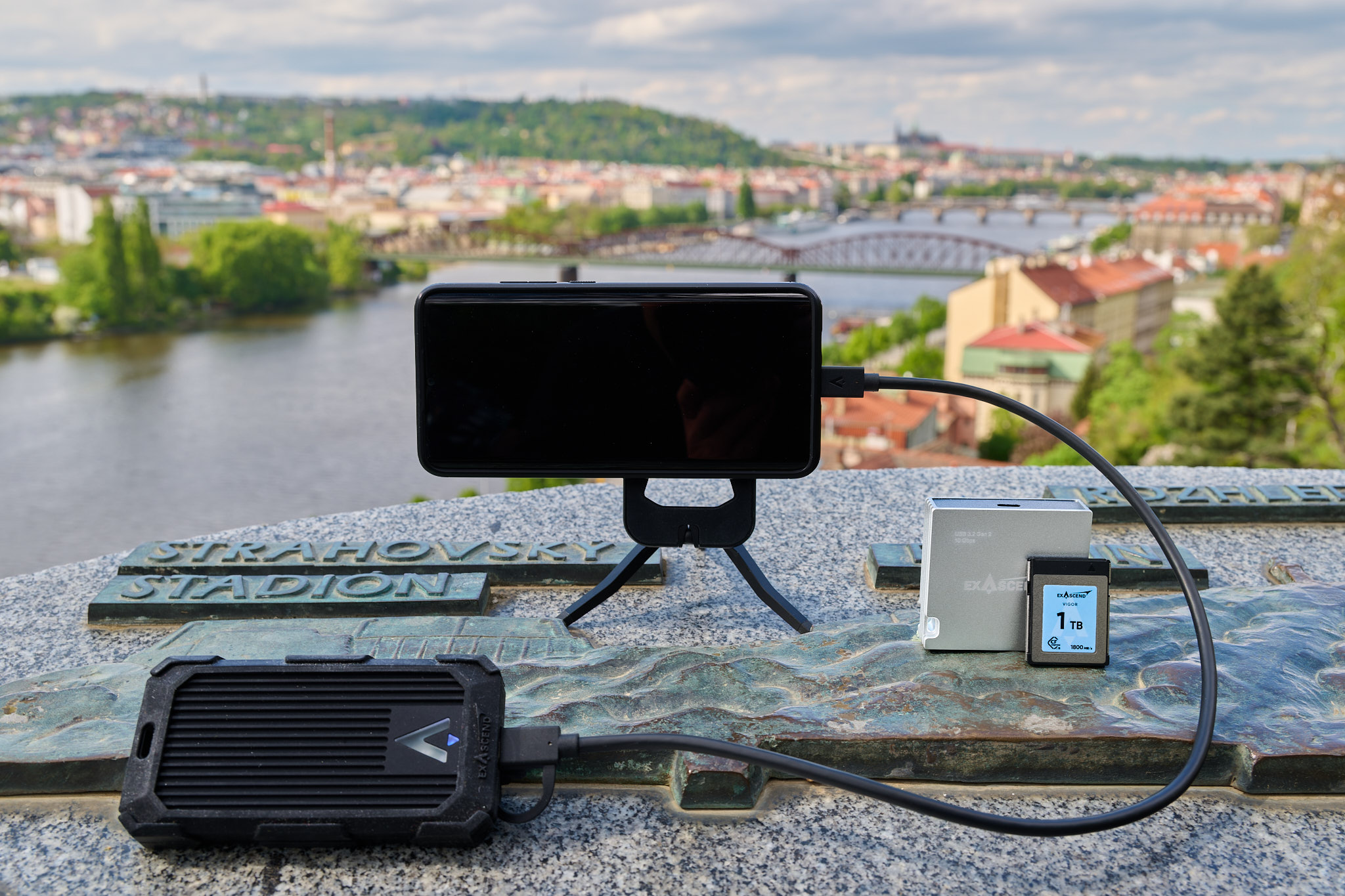
Backing Up Photos on Safari: Cards, Drives and Cloud Options
Backing up photos on safari is one of the most important things you can do to protect your travel memories. During a wildlife safari in Uganda, Kenya, Tanzania or Rwanda, you may capture hundreds of photographs every day. These can include rare animal sightings, beautiful landscapes and special moments that you cannot photograph again.
However, memory cards can fail, cameras can get damaged, and electronic devices can disappear during travel. Losing your photographs after several days in the wilderness can be disappointing, especially when you have spent considerable time and money planning your safari.
A reliable photography backup system helps protect your images throughout the journey. Whether you use memory cards, portable hard drives, solid-state drives or cloud storage, understanding how these options work will help you choose the right approach.
Why Backing Up Photos on Safari Is Important
Wildlife photography involves unpredictable conditions. Dust, heat, rain and frequent movement can affect your equipment. Although modern cameras and storage devices are generally reliable, problems can still occur.
Imagine spending three days photographing lions, elephants and cheetahs in the Serengeti. On your fourth day, your camera’s memory card suddenly becomes unreadable. Without a backup, you could lose every photograph stored on that card.
Regular backups reduce this risk.
A good backup routine protects you against:
Memory card corruption or accidental formatting.
Lost or stolen cameras and storage devices.
Physical damage caused by water, dust or impact.
Accidental deletion of photographs.
Computer or portable drive failure.
Unexpected problems during long journeys.
The safest approach is to maintain multiple copies of your photographs in separate locations.
1. Using Memory Cards for Safari Photography
Memory cards are the first place where your camera stores photographs.
Most wildlife photographers use SD or CFexpress cards, depending on their camera model.
Choosing reliable cards and managing them carefully can reduce the risk of losing photographs.
How Many Memory Cards Should You Carry?
The number depends on your camera resolution, file format and photography habits.
For example, a photographer using a 24-megapixel camera may produce RAW files averaging approximately 25–35 MB each.
At 30 MB per photograph, 1,000 images require about 30 GB of storage.
A seven-day safari involving 1,000 photographs daily could therefore generate approximately 210 GB of image files.
| Safari duration | Estimated photographs | Storage at 30 MB per image |
|---|---|---|
| 3 days | 3,000 | 90 GB |
| 5 days | 5,000 | 150 GB |
| 7 days | 7,000 | 210 GB |
| 10 days | 10,000 | 300 GB |
| 14 days | 14,000 | 420 GB |
These estimates exclude videos and will vary according to your camera settings.
Carrying several 64 GB or 128 GB cards can be practical because photographs are distributed across different cards.
Should You Format Memory Cards During Your Safari?
Avoid formatting a memory card until you have confirmed that its photographs are safely backed up.
If possible, keep your original files on the cards throughout your trip.
Use a simple system to separate full cards from empty ones.
A labelled memory card case can help you avoid accidentally reusing cards containing important photographs.
2. Portable Hard Drives for Photo Backups
Portable external hard drives provide large storage capacity at a relatively affordable price.
They are useful for photographers who capture thousands of RAW images.
A 2 TB portable hard drive, for example, can hold approximately 66,000 photographs averaging 30 MB each, although usable capacity and file sizes vary.
Advantages of Portable Hard Drives
External hard drives offer several benefits.
They provide substantial storage space, work with most laptops and allow photographers to organise images into folders.
They are particularly useful for safaris lasting several weeks.
However, traditional hard drives contain moving components and can be damaged by strong impacts.
Avoid dropping them or using them while travelling over rough roads.
For better protection, complete your backups when the vehicle is stationary.
3. Solid-State Drives: A Practical Safari Option
Solid-state drives, commonly called SSDs, are becoming popular among travelling photographers.
Unlike traditional hard drives, SSDs do not contain moving mechanical parts.
This makes them generally more resistant to vibration and physical movement.
Why SSDs Work Well on Safari
Portable SSDs are compact, lightweight and usually transfer files faster than traditional hard drives.
This is helpful when you return to your lodge with hundreds of photographs to copy.
A 1 TB or 2 TB SSD may provide sufficient storage for many photography safaris.
However, SSDs are usually more expensive per terabyte than traditional hard drives.
They can also fail, so you should never rely on one SSD as your only backup.
Hard Drive vs SSD Comparison
| Feature | Portable hard drive | Portable SSD |
|---|---|---|
| Storage capacity | Often high | High |
| Transfer speed | Generally slower | Generally faster |
| Resistance to vibration | Lower | Higher |
| Weight | Usually heavier | Usually lighter |
| Cost per terabyte | Generally lower | Generally higher |
| Safari suitability | Good with careful handling | Excellent for frequent travel |
For photographers who regularly travel on rough safari roads, a portable SSD is often a convenient choice.
4. Cloud Storage for Safari Photographs
Cloud storage allows you to upload photographs to an online account.
Services such as Google Drive, Dropbox, OneDrive and dedicated photography platforms provide different storage options.
Cloud backups are particularly valuable because your photographs remain accessible even if your camera, laptop or external drive is lost.
However, uploading photographs during an African safari may be difficult.
Internet Availability in Safari Destinations
Some safari lodges provide Wi-Fi, but connection speeds and reliability vary considerably.
Remote areas of the Serengeti, Maasai Mara, Bwindi and other protected areas may have limited connectivity.
Even where internet access exists, uploading large RAW files can take considerable time.
For example, uploading 30 GB of photographs through a connection with a sustained upload speed of 5 Mbps would take approximately 13 hours under ideal conditions.
Real-world uploads may take longer.
For this reason, cloud storage is best treated as an additional backup rather than your only storage method.
What Should You Upload First?
If internet access is limited, prioritise your most valuable photographs.
You might upload:
Your best wildlife photographs.
Rare animal sightings.
Important family photographs.
Selected edited JPEG images.
Photographs required for professional work.
Continue storing the original RAW files on your physical backup devices until you have reliable internet access.
5. The 3-2-1 Backup Rule for Safari Photography
Professional photographers often use the 3-2-1 backup principle.
It provides a useful way to protect valuable photographs.
The principle recommends:
3 copies: Maintain three copies of your photographs.
2 storage types or devices: Use separate storage devices or media.
1 off-site copy: Keep at least one copy in another physical location or in the cloud.
For example, your safari photography system could include:
Original photographs on memory cards.
A second copy on a portable SSD.
A third copy on another drive kept separately or in secure cloud storage.
This arrangement reduces the risk of losing everything through a single equipment failure.
Remember that two drives stored together in the same stolen bag do not provide protection against theft.
6. Backing Up Safari Photos Without a Laptop
Some travellers prefer carrying minimal equipment.
Fortunately, several backup methods do not require a full laptop.
Using a Smartphone or Tablet
Certain smartphones and tablets support external storage devices through USB-C or compatible adapters.
You may be able to transfer photographs directly between your memory card and an external drive.
However, compatibility depends on your device, card reader, storage format and available power.
Test the entire process before leaving home.
Dedicated Backup Devices
Some portable storage products support direct memory card transfers without a computer.
These devices can be useful for photographers who want a lightweight setup.
Before purchasing one, confirm that it supports your camera’s memory card type and allows you to verify copied files.
Avoid relying on equipment that you have never tested.
7. A Simple Daily Photo Backup Routine
A consistent routine helps prevent mistakes when you are tired after a long game drive.
The following schedule works well for many safari photographers.
| Time | Backup activity |
|---|---|
| Morning | Check memory cards and available storage |
| After game drive | Transfer photographs to your primary backup |
| Evening | Copy files to a second storage device |
| Before sleeping | Confirm that files open correctly |
| Every few days | Upload selected images when internet access permits |
| Before departure | Confirm all photographs have multiple copies |
Organise Your Photos by Date and Destination
Create clearly labelled folders.
For example:
2026-10-30_Serengeti_GameDrive
This makes photographs easier to locate later.
You can also create separate folders for destinations such as Queen Elizabeth National Park, Amboseli or the Maasai Mara.
Avoid complicated folder structures that become difficult to manage during travel.
8. Protecting Storage Devices Against Dust, Heat and Rain
Safari environments can be demanding for electronic equipment.
Dust may enter bags, vehicles and storage compartments. Rain can also arrive unexpectedly.
Keep your memory cards and drives inside protective cases.
Water-resistant pouches can provide additional protection, although they should not be treated as completely waterproof unless specifically rated for immersion.
Avoid leaving electronic devices inside vehicles exposed to direct sunlight.
High temperatures can damage batteries and affect equipment performance.
When transferring photographs, place your laptop and storage devices on a stable, clean surface.
Keep drinks away from electronic equipment.
9. Common Safari Photography Backup Mistakes
Several avoidable mistakes increase the risk of losing photographs.
Depending on One Memory Card
A large memory card may be convenient, but one failure could affect thousands of photographs.
Carry spare cards and back up regularly.
Deleting Files Immediately After Copying
A completed transfer does not always mean every file copied correctly.
Open a selection of photographs and compare file counts before deleting anything.
Keeping All Storage Devices Together
If your camera bag disappears, you could lose every copy.
Where practical and secure, keep one backup device in a different bag or location.
Forgetting Charging Equipment
Laptops, tablets and storage devices may require power during transfers.
Bring suitable chargers, cables and plug adapters.
A power bank can help with compatible devices, but check airline battery restrictions before flying.
Ignoring File Verification
Copying files is only part of the backup process.
Confirm that the destination contains the expected files and that they can be opened. For particularly important work, backup software that checks file integrity can provide greater confidence.
10. Choosing the Best Backup System for Your Safari
Your ideal setup depends on your travel duration, photography equipment and budget.
For a short safari, several memory cards and one portable SSD may be sufficient, although a second independent backup is safer.
For a longer photography expedition, consider carrying two external drives and keeping the original photographs on memory cards.
Professional photographers may require additional storage capacity, automated backup software and cloud storage for selected images.
Before departure, estimate your daily storage requirements and allow extra capacity for unexpected wildlife sightings.
A successful leopard hunt or large wildebeest crossing could produce far more photographs than you originally expected.
Backing up photos on safari should be part of your daily photography routine.
Memory cards provide convenient primary storage, portable hard drives offer affordable capacity, and SSDs provide fast transfers in a compact design. Cloud storage adds another layer of protection when internet access is available.
The safest approach is to maintain multiple copies, verify successful transfers and store backup devices separately.
With a reliable system, you can concentrate on photographing Africa’s wildlife without constantly worrying about losing your images.





No comment