

Using Merlin and eBird on an East African Safari
Using Merlin and eBird on an East African safari can make birdwatching easier, more organised and more rewarding, especially for travellers who are unfamiliar with Africa’s diverse bird species. Uganda, Kenya, Tanzania and Rwanda support an extraordinary variety of birds, including colourful bee-eaters, kingfishers, hornbills, turacos, eagles and rare forest specialists. Identifying these birds can be challenging, but modern birdwatching applications provide useful tools for recognising species and recording sightings.
Merlin Bird ID helps travellers identify unfamiliar birds using photographs, descriptions and available sound recordings. eBird allows birdwatchers to record the species they encounter, maintain checklists and contribute observations to a global bird database. Both applications are developed by the Cornell Lab of Ornithology and are available free of charge.
However, East African safaris often take place in remote areas where mobile network coverage is unreliable. Birdwatchers should prepare their applications before travelling and understand which features work without an internet connection. With good preparation, these tools can complement binoculars, field guides and the knowledge of experienced local birdwatching guides.
What Are Merlin Bird ID and eBird?
Merlin Bird ID and eBird are separate applications designed to support birdwatching.
Although both are connected through the Cornell Lab of Ornithology, they serve different purposes.
Merlin primarily helps users identify birds, while eBird focuses on recording observations and maintaining birdwatching checklists.
Merlin Bird ID
Merlin Bird ID helps users identify birds based on their physical appearance, photographs and available vocalisations.
The application contains information about bird species worldwide, including those found in East Africa.
Users can explore species descriptions, compare photographs and examine distribution information.
Merlin is particularly useful when you encounter an unfamiliar bird during a game drive or forest walk.
eBird
eBird is a global bird observation platform that allows birdwatchers to record the species they encounter.
Users can create checklists containing bird names, numbers observed, dates and locations.
These records can contribute to scientific research, conservation planning and understanding bird distributions.
For safari travellers, eBird also provides a convenient way to maintain a record of birds encountered during a holiday.
Merlin vs eBird: Main Differences
| Feature | Merlin Bird ID | eBird |
|---|---|---|
| Main purpose | Bird identification | Recording bird sightings |
| Bird photographs | Yes | Available through associated resources |
| Identification suggestions | Yes | Not its main function |
| Sound identification | Available for supported species | No equivalent live Sound ID |
| Offline use | Supported with preparation | Checklists can be recorded offline |
| Personal bird records | Life list features | Detailed checklists and birding records |
| Best safari use | Identifying unfamiliar birds | Recording confirmed sightings |
Why Birdwatching Apps Are Useful on an East African Safari
East Africa contains a remarkable variety of habitats, including tropical forests, open grasslands, freshwater wetlands and highland ecosystems.
Each habitat supports different bird communities.
For example, a safari through Queen Elizabeth National Park may reveal African Fish Eagles, Pied Kingfishers, Lilac-breasted Rollers and numerous waterbirds.
A visit to Bwindi Impenetrable National Park provides opportunities to encounter forest specialists such as turacos, barbets and various greenbuls.
Meanwhile, the Serengeti and Maasai Mara support bustards, secretarybirds, bee-eaters and numerous birds of prey.
Even experienced birdwatchers may struggle to identify every species immediately.
Merlin can help narrow down possible identifications, while eBird allows travellers to organise their observations throughout the trip.
How to Prepare Merlin Before Your Safari
Preparing Merlin before departure is particularly important because some national parks have limited mobile internet access.
The application supports offline bird information when users download the appropriate regional content.
Step 1: Install Merlin Bird ID
Install Merlin Bird ID on your Android or iPhone.
Complete the initial setup and become familiar with the application’s identification features.
It is useful to practise identifying familiar birds before travelling so that you understand how the application works.
Step 2: Download East African Bird Information
Open Merlin’s settings and locate the section called My Offline Birds.
Select and download the regional bird information relevant to your destination.
For example, travellers visiting Uganda and Rwanda should ensure they have suitable bird information for those areas.
If your journey includes Kenya and Tanzania, prepare the appropriate regional content before departure.
Downloaded information allows you to browse bird descriptions and available identification materials without relying on mobile internet.
Step 3: Check Available Identification Features
Merlin offers several identification methods, but their availability and accuracy differ.
Photo ID can suggest possible species from photographs.
Bird ID by description helps narrow down birds based on characteristics and location.
Sound ID recognises supported bird vocalisations, but its coverage is not yet comprehensive in East Africa.
As of October 2026, Merlin’s Sound ID does not reliably support most East African bird species. Travellers should therefore avoid depending on automatic sound recognition for identifying local birds.
Step 4: Practise Before Entering the Park
Try identifying several birds using photographs or descriptions before your safari begins.
This will help you navigate the application quickly when you encounter unfamiliar species.
How to Identify East African Birds Using Merlin
Merlin is particularly useful when birdwatchers obtain a reasonably clear view or photograph of an unfamiliar species.
Identify Birds by Appearance
Suppose you encounter a small green bird with a yellow throat while driving through Lake Mburo National Park.
You might suspect that it belongs to the bee-eater family but remain uncertain about the species.
Merlin can help you compare photographs, body shapes and other characteristics.
You should examine several features, including:
Overall body size.
Main feather colours.
Bill shape and length.
Tail markings.
Habitat.
Geographical location.
Behaviour and feeding techniques.
For this example, the bird might be a Little Bee-eater, although confirmation requires checking its markings carefully.
Identify Birds Using Photographs
Merlin’s Photo ID feature allows users to submit photographs for possible identification.
For better results, choose photographs showing the bird’s head, body and distinctive markings.
A side view is often more useful than an image where the bird is partly hidden by branches.
The application may suggest several species, so compare the results rather than automatically accepting the first recommendation.
Using Merlin for Bird Calls
Bird calls are important in East African forests because many species remain hidden among vegetation.
However, automatic Sound ID currently has limited coverage for East African birds.
You can still use available recordings and species descriptions in Merlin to learn calls where suitable reference material exists.
For difficult species, such as the Green-breasted Pitta or Papyrus Gonolek, an experienced local birdwatching guide remains especially valuable.
How to Use eBird During an African Safari
eBird is useful for recording birds encountered during game drives, boat safaris and forest walks.
Rather than trying to remember every species at the end of the holiday, you can create separate checklists for different birdwatching locations.
Step 1: Create Your eBird Account
Install eBird Mobile and create an account.
Choose your preferred language and measurement settings.
The application allows you to maintain bird records that can later be reviewed through your eBird account.
Step 2: Download Regional Bird Packs
Before travelling, download the eBird regional packs for your safari destinations.
These provide local species lists that remain available without mobile reception.
For example, if your itinerary includes Uganda’s Queen Elizabeth National Park and Rwanda’s Akagera National Park, prepare the appropriate country or regional lists.
Step 3: Start a Birdwatching Checklist
Begin a checklist when you start actively observing birds.
Select the date, time and location.
During a morning game drive, record the species you confidently identify.
You can also enter the number of individuals observed.
For example, a checklist from Lake Mburo National Park might include:
2 African Fish Eagles.
5 Lilac-breasted Rollers.
3 African Grey Hornbills.
8 Little Bee-eaters.
4 Grey Crowned Cranes.
These are illustrative counts, not actual records from a particular safari.
Step 4: Review Your Sightings
At the end of the birdwatching session, review your checklist.
Check species names and estimated numbers.
Avoid including uncertain identifications unless you have sufficient information to support them.
If you were deliberately identifying and counting all birds, indicate that you are submitting a complete checklist. Otherwise, report it as incomplete.
Step 5: Submit Your Checklist
When internet access is available, submit your completed checklist.
If you are offline, save it as an unsubmitted checklist and upload it when connectivity returns.
This allows you to record birds in remote safari destinations without needing a continuous mobile network connection.
Can Merlin and eBird Work Without Internet?
Yes, both applications provide useful offline features, although some preparation is necessary.
Merlin allows users to download regional bird information for offline reference.
eBird allows users to record and save checklists offline before submitting them when internet access becomes available.
However, online features such as retrieving updated observations, downloading new content and submitting records require connectivity.
Important Offline Preparation Tips
Before leaving for a remote safari:
Download all relevant regional bird information.
Test the identification features you intend to use.
Download eBird species packs.
Charge your phone fully.
Carry a suitable power bank.
Keep location services available.
Check that enough storage remains for photographs and recordings.
A power bank with approximately 10,000–20,000 mAh capacity can be useful during long birdwatching days, depending on the devices you carry.
Best East African Destinations for Using Merlin and eBird
Both applications can support birdwatching across East Africa’s national parks and protected areas.
Uganda
Queen Elizabeth National Park is excellent for recording savannah birds, raptors and waterbirds.
Mabamba Wetland provides opportunities to observe the Shoebill and other freshwater species.
Bwindi Impenetrable National Park supports numerous forest birds, including Albertine Rift specialists.
Kibale National Park offers additional opportunities to identify forest birds and record sightings during guided walks.
Kenya
The Maasai Mara supports grassland birds, vultures, raptors and colourful woodland species.
Lake Nakuru is particularly rewarding for waterbirds and other Rift Valley species.
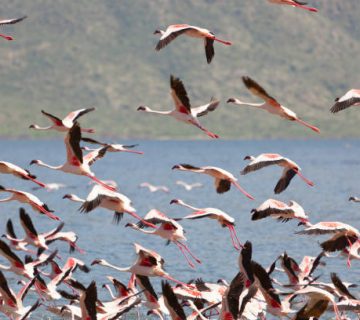
Lake Bogoria provides opportunities to observe Lesser Flamingos when feeding conditions attract substantial flocks.
Tanzania
Serengeti National Park supports a wide variety of savannah birds.
Tarangire National Park is rewarding for hornbills, rollers, bustards and other woodland species.
Lake Manyara National Park provides opportunities for wetland and forest-edge birdwatching.
Rwanda
Akagera National Park supports savannah, woodland and wetland birds.
Nyungwe National Park is particularly interesting for forest species, including several Albertine Rift birds.
Volcanoes National Park provides opportunities to encounter birds associated with montane forest habitats.
Using eBird Hotspots to Plan Birdwatching
An eBird hotspot is a shared birdwatching location where observers can submit records.
Before travelling, birdwatchers can explore existing hotspots to learn which species have been reported.
This may help identify promising destinations and habitats.
For example, you can examine past observations from a national park or wetland before arranging an excursion.
However, hotspot records do not guarantee that a species will be present during your visit.
Bird distributions change with rainfall, season, habitat conditions and migration.
Recent observations can be useful, but they should be combined with advice from knowledgeable local guides.
How to Record Birds Correctly During a Safari
Accurate records are important because eBird observations may contribute to scientific research.
Travellers should distinguish confirmed sightings from uncertain identifications.
Use Accurate Locations
A checklist should represent the location where birdwatching actually occurred.
If you travel between distant habitats, create separate checklists rather than combining everything under one location.
For example, a morning game drive in Kasenyi and an afternoon boat safari on the Kazinga Channel should be recorded separately.
Record Realistic Bird Numbers
Count birds carefully whenever possible.
For large flocks, make a reasonable estimate.
Avoid entering exaggerated numbers simply because birds appear abundant.
Record Observation Effort
Where applicable, include the duration, distance and number of observers.
These details help distinguish a short observation session from several hours of dedicated birdwatching.
For vehicle-based birdwatching, eBird’s travelling protocol can be appropriate when you are actively observing birds along a route. Use a separate checklist for substantially different locations or sessions.
Common Mistakes When Using Birdwatching Apps
One common mistake is accepting every automated identification without checking it.
Merlin provides suggestions, but mistakes can occur when photographs are blurred or birds have similar markings.
Another mistake is relying on Sound ID in regions where species coverage is limited.
Travellers should also avoid submitting birds to eBird simply because an application suggested their identity.
Other mistakes include combining multiple national parks into one checklist, reporting species not actually observed and forgetting to submit offline records.
Careful observations are more valuable than long lists containing uncertain identifications.
Respecting Wildlife While Using Birdwatching Apps
Birdwatching applications should support responsible wildlife observation.
Avoid repeatedly playing recorded calls to attract birds, especially near nests or breeding territories.
Excessive playback can disturb birds and interrupt normal feeding or breeding behaviour.
Never leave an authorised safari vehicle to approach a bird in an area where dangerous wildlife may be present.
You should also avoid sharing sensitive nesting locations in ways that could encourage disturbance or illegal collection.
eBird applies restrictions to certain sensitive species records, but observers should still exercise care when documenting vulnerable wildlife.
How Merlin and eBird Support Bird Conservation
Merlin helps people learn to identify birds, while eBird provides a platform for recording observations that may contribute to wider scientific understanding.
Bird records collected over time can help researchers study distribution, seasonal movements and changes in abundance.
However, individual records are most valuable when observers report accurate species, locations and observation effort.
East African birdwatchers can contribute useful information by submitting careful checklists from national parks, wetlands and other habitats.
The value of these records increases when they are collected consistently and reviewed for accuracy.
Why Local Birdwatching Guides Remain Important
Although Merlin and eBird are useful, they cannot replace the experience of a knowledgeable local guide.
East Africa contains many birds that are difficult to identify because of similar plumage, limited visibility or complex vocalisations.
A guide familiar with local habitats can recognise calls, identify likely feeding areas and locate species that visitors may otherwise overlook.
For example, a specialist guide in Bwindi may recognise an Albertine Rift bird from a brief call, while a guide at Mabamba can help distinguish wetland species hidden among papyrus.
Combining digital applications with local knowledge generally provides a more rewarding birdwatching experience.
Getting More From Merlin and eBird on Safari
Using Merlin and eBird on an East African safari can help travellers develop their identification skills, maintain accurate bird records and appreciate the region’s remarkable bird diversity.
Merlin is particularly useful for comparing photographs and identifying unfamiliar species, while eBird provides a structured way to document sightings across different locations.
Before travelling, download the necessary regional information and become familiar with each application’s offline capabilities.
Remember that automated identification has limitations, especially for bird sounds in East Africa.
With binoculars, patience, careful observation and an experienced local guide, these applications can help turn an ordinary game drive or forest walk into a rewarding birdwatching experience.






No comment